Category: Thoughts

  • Homebrew Saves Me Time Every Day

    Homebrew Saves Me Time Every Day

    I don’t remember exactly when I started using Homebrew, but I know that I had been using a Mac as my regular computer for a while and wanted an alternative to manage dev tools. Homebrew would turn out to be my first foray into the concept and practice of package management, and it’s been tremendously useful for me.

    I keep a personal MacOS setup guide on Github because I swap laptops or reformat my laptop enough that I want to keep track of what tools I use. Adding Homebrew to my software management suite has been instrumental in making this work. I can install and update software and clean up outdated versions. I even wrote a tutorial on setting up a keyword script last week that makes this even easier for me.

    What is Homebrew

    Homebrew describes itself as The missing package manager for macOS and for good reason. It allows me to install/uninstall/update/downgrade/manage software used on my Mac directly from the command line.

    This saves a bunch of time and overhead, and allows me to bulk install programs. I can take a list of install commands, paste them into my terminal, and have them all run at once. Below is a list of programs that I install with Homebrew on a new machine currently, which turns hours of installation into a few seconds of typing and a few minutes of letting the machine run in the background.

    brew install arp-scan
    brew install asciidoc
    brew install brew-cask-completion
    brew install cmake
    brew install composer
    brew install docbook-xsl
    brew install ghostscript
    brew install git
    brew install highlight
    brew install imagemagick
    brew install lastpass-cli --with-pinentry --with-doc
    brew install nmap
    brew install node
    brew install openssl
    brew install php72
    brew install php-cs-fixer
    brew install phplint
    brew install pkg-config
    brew install python3
    brew postinstall python3
    brew install thefuck
    brew install vassh
    brew install vim
    brew install wget
    brew install wrk
    brew install zsh-syntax-highlighting

    Homebrew Cask

    Some programs don’t exist in Homebrew, usually the apps that you use with a GUI, as opposed to command line tools. For these there is
    Homebrew Cask, an extension of Homebrew for the software that doesn’t exist in core.

    So instead of having to open up Safari on a new machine (or IE for the Windows folks, with a tool like Scoop or Chocolatey – The package manager for Windows) just to download Chrome, I can open my terminal after Homebrew is installed and type brew install chrome to get the latest version of the browser installed and ready to use. No more downloading zipped files, unzipping a package, running the package and accepting pages of prompts, and having to eject the package to delete the install files.

    Updates are great too. With the script that I shared last week I update all of my apps every morning, ensuring that I have the latest, greatest, and most secure version. This also means that I am far less likely to open an app on my computer as I’m ready to use it, only to be greeted with a “new version available” dialog to either forget or stop my workflow.

    Here are the cask packages that I currently install after I reformat my computer, which covers the majority of apps that I use.

    brew cask install alfred
    brew cask install arduino
    brew cask install boostnote
    brew cask install calibre
    brew cask install cleanmymac
    brew cask install dropbox
    brew cask install etcher
    brew cask install evernote
    brew cask install firefox
    brew cask install google-chrome
    brew cask install imageoptim
    brew cask install iterm2
    brew cask install nordvpn
    brew cask install owasp-zap
    brew cask install qlcolorcode
    brew cask install qlmarkdown
    brew cask install qlprettypatch
    brew cask install qlstephen
    brew cask install quicklook-csv
    brew cask install quicklook-json
    brew cask install sequel-pro
    brew cask install signal
    brew cask install skype
    brew cask install slack
    brew cask install spectacle
    brew cask install sublime-text
    brew cask install suspicious-package
    brew cask install telegram
    brew cask install transmit
    brew cask install vagrant
    brew cask install virtualbox
    brew cask install vlc
    brew cask install webpquicklook
    brew cask install caskroom/fonts/font-source-code-pro

    Followup and Conclusion

    I just learned that Homebrew has a Patreon to support development of the project, and I just pledged a token monthly donation. For all that it’s given me, it’s definitely proven valuable.

    Read the documentation for Homebrew for all of the cool things that you can do with it. The project homepage has fairly straightforward installation instructions.

    You can see a list of the current Homebrew Formulae, as well as search the available Homebrew Casks to see if your favorite tools are available.

    Do you use Homebrew yet? Do you have another method to manage updates that I should know about, or some tools that I’m missing? Let me know here or on Twitter!


  • Updating Websites is Tiring

    Do you know what’s more tiring than updating all of your personal information and the information on all of the websites that you can think to update?

    Doing that while working on migrating clients to a new maintenance platform, one at a time.


    Do you know what’s even more tiring than that?

    Determining that the first solution that you’re migrating your clients to likely won’t fit your needs just yet, and having to migrate them to something else.


    I can’t say that I didn’t spend a lot of time on the computer this weekend, but I can say that I did waste a lot of time on the computer in unproductive ways.

    On the bright side I did finish Broad Band by Claire L. Evans this morning, and I greatly enjoyed it. I’ll try to do some book reviews again in the future that aren’t just an annual overview like last year.

  • You May Have Noticed a Domain Change

    So I haven’t been secret about it, but I also haven’t been discussing it a ton since I was waiting for it all to get sorted out. I’ve been working on getting my name changed since around September of last year, and I’ve finally begun getting updated official IDs and updating all of my internet things this past week. From now on my name is officially david Wolfpaw.

    It wouldn’t be worth writing about if I just took my husband’s name when we married, but we decided not to do that. However I couldn’t shake the thought, and was considering what other things that I could do. I’ve been changing so many things around and becoming more of an adult, and realized that I could just do whatever I wanted.

    My previous last name, only seven letters long, was complex in it’s simplicity. It was hard for people to pronounce even after having it pronounced for them, and it was even harder for some people to spell, again after having it spelled out for them. As an example, the paperwork got delayed for a few months because the clerk of court who filed my document, that I printed out with the correct spelling, filed it under an incorrect name and it got lost and had to be amended. Three months gone to that!

    Not to mention the fact that I was not the only one with my name, and not even the only one with the same first, middle, and last name that lives in the state of Florida. I decided that if I were going to change, I would take cues from my husband’s name, but choose something that I did not see anyone currently using as a last name.

    To that end, I spent plenty of time thinking, and I admit that I’ll never feel fully comfortable with my decision, having changed a core identifier (so that I’m not just one of the many WordPress davids) after establishing myself, and crossing that 30-year-more-adult-threshhold.

    The joke I’m going with for now is that while my husband got one finger, I get to have the whole paw. The other joke is on me, when I found out that furries ruin everything™, because it turns out that the name wolfpaw is being used as a screen name already on about 2/3 of the services that I have tried swapping accounts on. The person who has @wolfpaw on Twitter has at least four separate accounts that I easily found, and they’re all sitting inactive for years.

    Speaking of changing services, some websites make it far harder than it should be to change names or usernames. I get that I need to show documentation to the bank or my credit card company, but the annoying websites that I mentioned last week treat their ownership of my outdated data too seriously.

    After months of waiting, the past week has actually progressed rather rapidly. I went to court last week, confirmed that I wasn’t trying to hide from the law by going to the lair of the law itself (although I guess I should stopped being surprised when I hear people getting caught that way), and the judge passed the order. After that I waited a bit to get some documents, then used those to start getting all of the other ones.

    So that’s my weirdish story on changing my name to something made up yet still based on real words that will probably be an entirely different source of confusion for a few years at least. If only I was Henry Lizardlover who made it super clear with his last name what his deal was ????

  • I’m Gonna Blog Cheat For a Day

    And say that I made a delicious meal, got to play some board games with friends and family, and read a bit.

    I also managed some client sites, fixed a few bugs with a theme, and worked on migrating to a new business platform.

    Some days are simply full enough as is. Today was one of those days. I’m a bit upset that I didn’t do a full blog post, but I’m glad for the things that I did get done. And that’s going to be enough.

  • Why Keep a Personal Site Anyway?

    I was thinking about my blog today, and the challenge that I’ve undertaken. I’ve also been thinking lately about other ways that I can get involved in the IndieWeb community besides running an alternative to Twitter and playing around with tools.

    I have been interestd in the community from the sidelines ever since I’d heard of it, but like most communities I either never join or wait until years of quietly lurking to get involved. In this case I want to end that and find some project that I can make some contribution to.

    The reason that it interests me so much is in part a nostalgia for the older days of the web. Everyone had their own identity and most websites that you visited were low budget affairs made by someone with a passion for the specific topic of that site. Many of my earliest memories of the web were fan sites for the pop culture that I was interested in at the time.

    Which mainly just meant whatever book series I was into at the time.
    Photo by Eli Francis on Unsplash

    But why do I bother maintaining my own blog now that the web has been subsumed by Twitter, Facebook, and all of the other social media sites that we pour most of ourselves into these days? Even if I want to write something longer, can’t I just put it up on Medium?

    It’s Important to Have Your Own Space

    Being able to share and interact easily with others is valuable, and it’s a reason why most of us have moved into the walled gardens that have been created to collect our data. But there are also limitations to playing in someone else’s sandbox.

    If you have your own space, you can do a lot with it. You can have those wonderful branded emails that make you look more official, even if you forward them elsewhere. You get to set the tone of the space, and design it to fit your needs and aesthetic. Don’t like the way that it looks? Change it!

    You can also dictate what happens in that space, including what is and is not included, updated, added, removed, or modified. You get to be more in control of your web presence, and not just let your presence there be in control of you.

    Ownership is Valuable

    Let’s not forget some of the dangers of putting most of your emphasis on someone else’s platform, like inadvertently sharing enough data about yourself and others to help swing an election. Or making yourself a better target for all manner of people eager to scrape your data, from marketers to harassers.

    You also have portability to worry about. If you chose to leave Facebook today, what would you do with all of the content that you created there? Would you be able to easily move it to another platform, so that all of the posts, pictures, videos, and other content that you’ve created and shared over the years lives on after your account does not?

    What happens when those websites disappear and/or delete your data, as so many social social networks have over the years that I don’t even want to link every word in this sentence to one? What about when they get sold to another company that doesn’t share the same values of the original company, and your content is censored like LiveJournal started doing under Russian ownership?

    Be a Part of the Solution

    The point is, when you don’t own your data and presence, someone else does, and they get the ultimate say in it. Having a space to call your own online means that you always have a refuge from that lack of agency.

    There are many ways that you can get involved, and many more that I’m learning the deeper that I get into research. I’m starting with my own site here, and the archives that I keep of things that I do online. What will you do to keep some portion of the web that you create in your control?

  • Do you track time? I don’t but maybe should.

    Do you track time? I don’t but maybe should.

    When I decided to commit to a blog post every day this month I knew that I would be challenged. Several days I published later at night, while several days I was able to turn out articles much earlier in the day.

    I don’t really track my time that well. I’ve used tools in the past to track time in both my personal and professional life, but none ever really stuck for me. Nor have I gotten into a productivity system based on time, like Pomodoro.

    The… third one. I think.
    Pomodoro via Marco Verch on Flickr

    The main reason for this is that I forget. The next reason is that even if I use a tool that will notify me when it’s time to swap tasks or hit record on a timer, I ignore them. I get into the zone on one project finally, and since that’s hard enough for me I try to hold onto that focus as long as I can.

    This week has been a particularly challenging one for maintaining any sort of project schedule. After client tasks I’ve been a bit more free form in my day. That can be both a good thing and a bad thing.

    The good thing about having that time available is that I can choose what I want to work on. The bad thing is that I can also choose to not devote enough time to any one project. This week I’ve been doing a lot of research for a potential project, but not much in the way of planning or work on it or any of my other projects.

    I’m not saying it’s good or bad to keep a set schedule and track every single task that you do. I’m just thinking that I could benefit from a more well defined set of tasks, and the ability to more easily ignore nonessential tasks that pop up during the day.

  • Creating a Homebrew Workflow with Alfred on MacOS

    Creating a Homebrew Workflow with Alfred on MacOS

    One of the first suggestions that I was given when I switched from Windows to Mac was to install and use Alfred, a productivity app for Mac OS X. I have to thank Mason James for the suggestion, as Alfred has been an integral part of my Mac usage ever since. Tomorrow I’ll give an overview of what Alfred is and does, but for now I want to talk about a specific workflow that I made. It’s very simple, but that’s a plus for a starting up tutorial.

    Update 11 January 2019: I wrote about a workflow for Homebrew that I started using.

    What are we going to create?

    The task that we’re setting up is going to be a keyword that will run a series of terminal commands for us. I use Homebrew as a package manager for software on my Mac. This, along with Homebrew Cask allows me to manage most of the software that I use on my computer from the command line.

    Similar to an overview of Alfred, I’ll give an overview of Homebrew later, but for now I’ll assume that you can setup both from those sites. Backwards maybe, but I want to show something simple that it can do before walking through setting it up.

    So with Alfred I can set keywords that run commands. In this case, I’m going to make a keyword, brew, that when used will run a series of commands to check for updates of installed software, perform those updates, clean up outdated software versions, and check that everything is functioning properly.

    We’re going to have eight commands run sequentially, so instead of having to type each of those commands manually and wait for each to run, we can type one keyword, have terminal open for us, and let it run in the background while we continue working.

    Let’s get started

    1. Create a new Workflow.

    Open Alfred Preferences, and navigate to the Workflows screen. In the lower left of the screen click the plus button to create a new Workflow. To save time, go to Templates > Essentials > Keyword to Terminal Command, and select that template. Give a name and description to your workflow, and add an icon if you want.

    Setting up a template Workflow
    Starting with a template for our Workflow
    Adding details to the Workflow
    Setting the details of our Workflow

    2. Set the options and commands for your Workflow.

    The two nodes of the workflow
    The two nodes of our Workflow

    When you create the Workflow you’ll have two nodes to work with: the keyword, and the terminal command. Double click on the keyword box to pull up the options for the keyword. We’re going to set brew as our keyword, and change to no argument since we aren’t adding any other commands. If we wanted to we could say setup an argument to update brew, cask, or both, but I just do both by default. I add a title and icon to display when I run the command and click save.

    Setting a keyword for the Workflow
    Setting the keyword options for our Workflow

    Next, double click on the terminal command node. This is where we’re going to put the commands that are going to run after the terminal is opened. The below commands are what I have setup for my Workflow.

    brew update
    brew upgrade
    brew cask upgrade
    brew cleanup
    brew cask cleanup
    brew prune
    brew doctor
    brew cask doctor

    The above updates Homebrew and Cask, then upgrades software that is currently installed and out of date for both. Next we use cleanup to uninstall older versions of the apps that have been updated. Prune will cleanup any outdated symlinks, and doctor will display any notes for potential problems that we can review.

    Add terminal commands to the Workflow
    Adding terminal commands to our Workflow

    Let’s save this series of commands and give it a go!

    3. Try running the command.

    To use this command we need to type our keyword into the Alfred menu. Use whatever hotkeys that you have set to open Alfred (the default is option+space). When you start typing the brew keyword you’ll see the workflow appear as an option. Click enter when it’s selected to run the command.

    Running our Workflow with a keyword
    Typing our keyword pulls up our Workflow

    If everything is setup properly your terminal application should open and paste in the series of commands. Since each is on a separate line they will run sequentially. You can see the commands as they run and any output they have. Since I ran this command shortly before taking screenshots for this tutorial everything is already up to date for me except for a bit of cleanup.

    Commands running in our Workflow
    Running the Workflow opens terminal and runs our commands

    Awesome! This saves a bunch of time!

    This Workflow saves me a bunch of time by updating applications in the background without having to wait for me to open them and have each application run their own update check. Since I’m opening an app when I want to use it the need to update can interrupt my workflow.

    The benefits of this system include:

    • All applications stay up to date with new features and bug fixes
    • I don’t have to wait until I want to use an app to update
    • I won’t click ignore on an update and forget to do it later
    • I can make sure that my computer stays clean with outdated versions of applications getting removed for me
    • I don’t have to remember all of the commands to run, what order to run them in, or have to wait for each one to run before typing the next one

    If you use Homebrew already, I’d suggest setting something like this up to make it easier to manage. It only took me a few minutes to setup, takes a second to run whenever I have time to update (generally every morning for me), and provides the kind of background benefits that save a bunch of headaches over the long term.

  • Obligatory Why I Deleted Facebook Post

    Obligatory Why I Deleted Facebook Post

    Earlier I read this article on Jonathan Pizarro’s blog: Radio Free Mister Pizarro. In it he describes why he left Facebook recently. Some of his story mirrors my own, in how networks like these

    I deleted my account about six weeks ago, but like Jonathan, my discontent and disinterest in the platform began much earlier. I removed all of my interests, likes, friends, and non-essential groups and pages about two years ago, around the same time that I unlinked my Twitter account from Facebook, which removed around 95% of the content that I’d previously been posting to the platform.

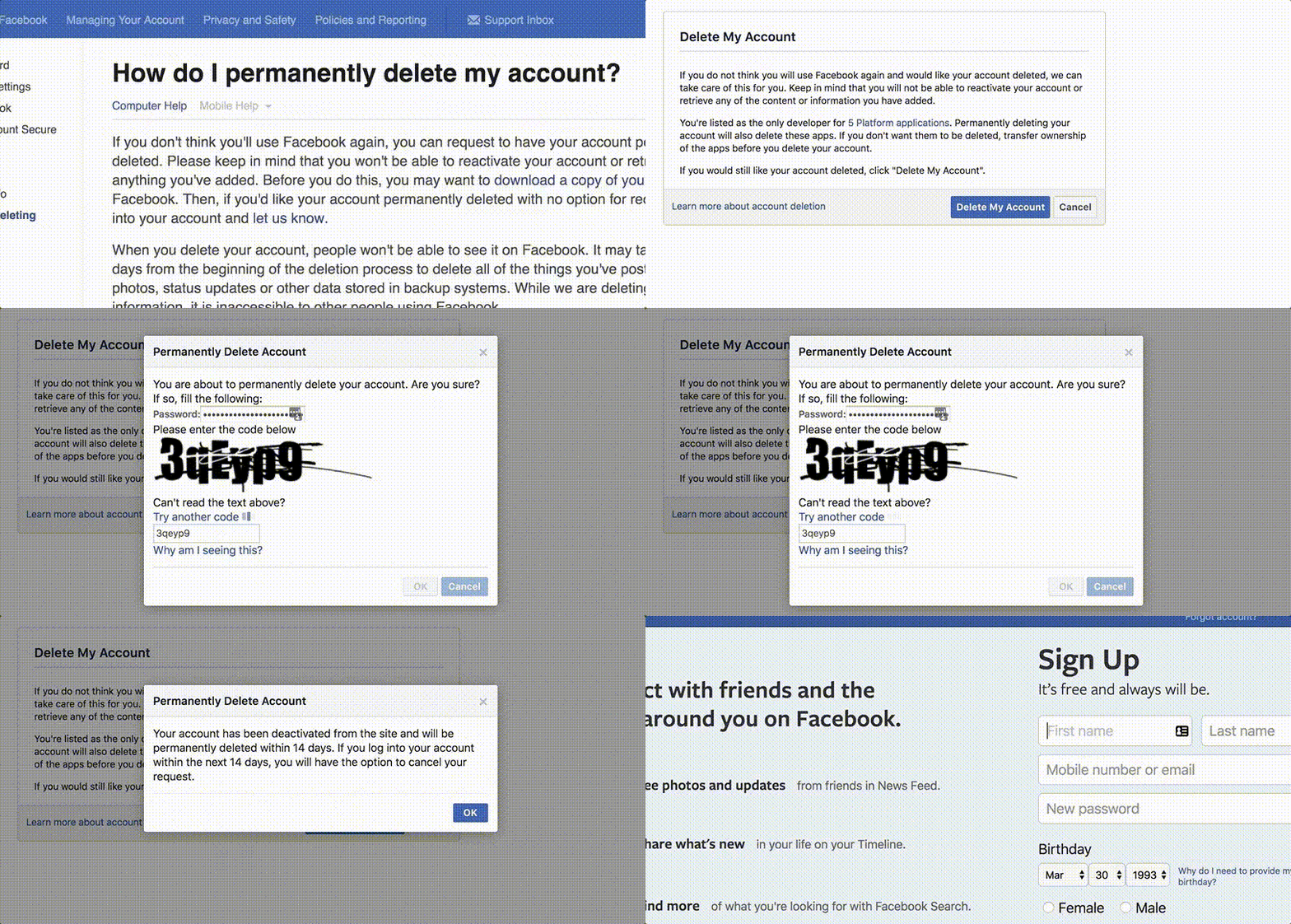
    Here’s a handy demonstration since it’s not easy to find the delete page

    Why was I ever on Facebook?

    Honestly it was never really something that interested me. I’m generally behind the curve on social media, though I enjoy the fact that cultures can exist online. I never paid much mind to Myspace, and I only signed up for Facebook in the Fall of 2005 due to school. It was my first semester at UCF, and a classmate on a group project told us that she’d post info for our project to her Facebook page.

    I assumed that it functioned the same as Myspace, where visitors who weren’t logged in would still be able to see what was posted, but from the start Facebook was a highly walled garden. I created an account because I didn’t give much thought to the bargain that I was striking, one that I don’t think many of us do.

    That bargain is one that many people have taken to discussing over the past few months, but I’ve not seen many accounts of people actually changing behavior due to any scandal that hits the company. Indeed, while there may have been temporary drop-off, there’s proof that the Facebook app is addicting based on download numbers in March of this year, as news of the Cambridge Analytica scandal was becoming widely reported.

    https://twitter.com/antoniogm/status/985987678976983041

    How much does it provide me?

    Right now it’s providing minor headaches, at best. But they are small compared to the larger headaches that I was feeling beforehand. If you’ve ever seen that South Park episode about Facebook, you know some of those headaches too. The social obligation and freemium gaming ones, not the Tronesque nightmare. Or maybe you do, and if so fine, live your own life.

    Seriously, I’ve lived the above almost verbatim.

    I no longer have access to the WordPress Orlando Facebook group that I started, but the group already had several administrators. I handed off ownership to other organizers, and not only trust that they will do a good job managing it, but won’t be personally affected if they don’t.

    I no longer get to use my business pages, but I’ll be totally honest and say that I never used them, and the bit that I did was mainly out of the exhortations that if I didn’t have them my business wasn’t going to thrive. I can’t say that having a Facebook page would hurt my business, but I certainly never used it to get any leads.

    I don’t see event invites, but for the events that I would be going to, I’ll know about them in other ways. If I don’t hear about an event, then in a solipsistic view, did it ever really happen?

    So why did I leave?

    I’m already used to the conversation with others that I missed something that they or someone else posted since I’m not following them, but that’s one area that I’ve been able to avoid FOMO for years. I have the privilege of not relying on someone else’s news to define how I act, and if it directly relates to me, they would know other ways to contact me. If they don’t find another way to contact me I consider it just as much on them. I don’t think that it’s an unacceptable burden to have someone who wants to contact me have to look at a second source, many of which are readily available and searchable.

    But still, none of those are the real reason that I deleted my account. I quit years ago due to the disgust at myself for the enchantment with a feed that can be called toxic at the best of times even when solely populated by a friends list.

    The real reason for deletion had as much to do with making a statement and sticking to ideals as anything else. While I’m not a first-class builder or user of decentralized and Indieweb technologies (though I’m actively working to change that), I agree with the idea that we should have viable alternatives to handing over all of our stuff to one company. I did write last week about running an Alternative to Twitter, which right now is more of a testbed and experiment than anything else. I don’t think that services like Mastodon will get widespread adoption without an as-yet-unseen killer app, but they are a starting point for a conversation that is gaining ground.

    I don’t want to worry about what a company will do with my data. Or as I described on Saturday, whether I can even request that data be deleted when I’m done with the service. I want to be part of that idealized world where we get to have a say in what we do on the internet. It seems like more and more is already technically feasible, and it’s just the will of creators and consumers (and hopefully more overlap of the two) to put decentralized systems to use. I want to be a part of that solution.

    Deleting Facebook doesn’t directly help with that in my case. But it doesn’t hurt either. And it’s only personally doing me good.

  • My Totally Great Guide to Managing Email Like a Pro

    My Totally Great Guide to Managing Email Like a Pro

    This morning I read a new article from Joshua A. Krisch posted to fatherly.com called “Why Email Is So Stressful, According To Science”. As the headline makes clear, the author believes that email anxiety is one of the biggest causes of stress for the average office worker.

    Everyone seems to have their own system for dealing with email, whether it’s treating it like a game, trying for inbox zero, responding to a few at a time and ignoring the rest, or throwing their hands up and declaring email bankruptcy.

    The last option is not uncommon, but is also scary since we all assume that somewhere in those unread emails is that exact opportunity that we’ve been waiting for, and it’s through our inability to manage the growing pile of correspondence that we’re missing out.

    Another fear is that we’ve waited too long to respond to an email, and as time goes on we naturally want to respond to it less, as our guilt around not responding grows. The podcast Reply All decided to fight back two years ago by starting the holiday Email Debt Forgiveness Day, which was just a few weeks ago. If you missed out you can still find info on their site on how to celebrate, along with a helpful email template.

    But does it have to be this hard? I get stress from email time to time, but I admit that it’s never been all-consuming in my life, personal or work. I don’t think that I’m preternaturally disposed to being less stressed by communication, far from it. I have found a few things that make email easier to manage for me, and I’m going to put on my productivity wizard hat to dictate how you should handle your communications.

    1. Check Email Less Frequently

    This one should be the most straightforward. If you check email less frequently, you have a better opportunity to treat it like a discrete event. Use the novelty of checking a few times per day to provide more focus to what you’re checking.

    I keep my inbox clean enough that I’m ok with keeping it in reverse chronological order. I click at the top, and have the Gmail settings for the send and archive buttons as well as the auto-advance lab feature on. I also use keyboard shortcuts on my accounts, allowing me to use my keyboard more, which I’m already using to write.

    You can find the Send & Archive button as well as the keyboard shortcuts in Gmail in the settings page located at https://mail.google.com/mail/u/0/#settings/general. The Auto-Advance lab feature can be turned on here: https://mail.google.com/mail/u/0/#settings/labs

    The Send & Archive button on email compose means I save a few clicks and a screen load.
    The Auto-advance feature also saves time by letting me move directly from one email to the next.

    Using those features I can more quickly progress through email while clearing out my inbox. Every email is acted on and archived.

    I start out with a win by making a lot of email skip the inbox in the first place by filtering them to folders if they are automated notifications or newsletters. I currently use Unroll.me to group emails together, but I’m phasing it out as I transition to a new email account.

    2. Get off of the Notification Cycle

    I’m not a fan of notifications pretty much anywhere. I have a few things that can send me notifications like work messages and texts, but otherwise I let apps and websites stay quiet unless I choose to check on them.

    I could expound upon how this relates to email specifically, but honestly it helps reduce stress with a lot of how I use the web. I end up checking some things more frequently than I’d like, but I let them fit to my schedule, not the other way around.

    3. Know When to Say No/Manage Expectations

    I know the urge to say yes to requests can be powerful. I do this all the time, and I don’t fault anyone else who does. It’s only over the past few years that I’ve started learning how to say no to things that don’t fit my skillset, or that don’t directly help me gain new skills or serve clients better.

    I get the idea that you miss 100% of shots not taken, but maybe those aren’t the shots that I should be taking anyway.

    I also try to let people know when and how I’ll respond, if I am going to have to pass on something, or if there will be further action taken. Being direct is one of the best things that I’ve learned to do in email both to set expectations for others, as well as clarify my thinking.

    If I can put my desires into words, I can have a better chance of making them happen.

    4. Treat Email as a Separate Medium

    This is a habit that’s hard to make. What I mean by treating email as a separate medium is that it’s not a text, it’s not a letter, and it’s not a social media update. Email has existed in a similar form to what we use now for almost fifty years, yet we still want to write full letters with greetings and salutations.

    Chances are I know who you are if I’m responding to an email, and vice versa. I understand that some people feel rude sending short emails, but generally an email that can be answered quickly – or doesn’t require an answer at all – makes recipients feel even better. One hundred people can send me emails that individually take them a few moments to compose, but if they all send in teh same day that equals hours of time dealing with them.

    On the topic of emails without response, I’m still looking for a polite way to let people know that emails don’t require a response. Don’t feel obligated to send me a “Thanks for handling this!” email, when all it ends up meaning is another message to manage.

    So, that’s my attempt at an email listicle. What email tricks should I be trying out? Make me feel more productive!

  • Your Data is Strewn Across the Internet

    This morning I started tackling a todo that I’ve been meaning to handle for a while: going through my LastPass account manager and checking on the ~600 sites and 900ish entries that I have. This is after some regular small cleanups in the past to satisfy their vault password challenge requirements.

    I don’t want to just go through and delete old account logins, though I admit that would be much easier than what I got myself into. Instead, I decided that I should go to old accounts that I no longer use and actually delete them and their associated data before removing account information.

    I have accounts with highly personal information, beyond my name and even address, up to information for my parents, finances, schooling, and more, all with various levels of account deletion abilities. This isn’t the kind of information that I want to purposefully leave in databases that I don’t have control of after having put the information there myself.

    All of that considered, I began the slog of working through that long list, looking for sites that I still use, are for clients, I no longer need, or aren’t even online anymore (more than I’d have suspected at the start).

    How Hard is This?

    For many websites it’s not terrible. You may have to navigate multiple screens, but the delete feature is available to you. Even Facebook, which I finally got rid of a couple of months ago, has a self-delete tool, though I question how much that actually deletes, and that is still harder than it should be to find.

    Several websites require you contact support, which is a pain but not entirely surprising. What is a pain is how hard it is to contact support on these sites. Several sites offer phone support only, or chat support that often won’t load with an ad-blocker on.

    The sites that are most infuriating are the sites that don’t allow you to access your account details at all after logging in without extending your subscription. Intuit and AgileCRM are two examples of this type of site, which allow me to login to my account, but won’t allow me to progress beyond a “give us more money because you’re expired” interstitial. This means that even if I’m signing in solely to get rid of the highly personal data that they have stored on me, I can’t. Both have received emails from me, along with the other sites that I can’t delete myself from.

    A Barnes and Noble support person directly told me twice that they do not delete accounts, even after I questioned whether that option would become available after 25 May.

    What about WordPress?

    Funny enough, for as long as I used WordPress on hundreds of accounts, many of them administrators, I didn’t realize that standard users don’t have the ability to delete their own accounts. Thanks to the forthcoming General Data Protection Regulation taking affect in the EU in under two weeks, WordPress core has been considering how to comply and addressing those issues, albeit slower than a project of this size should be taking it up.

    While I don’t know how it’ll work, it does look like the idea of being able to delete your own data and anonymize it is being worked on (#43637 (Add filters and ajax support for personal data erasure) – WordPress Trac). It’s yet to be seen how this will work for an end user, but I hope that it becomes as easy as many other features of WordPress have become.

    Who are the Winners?

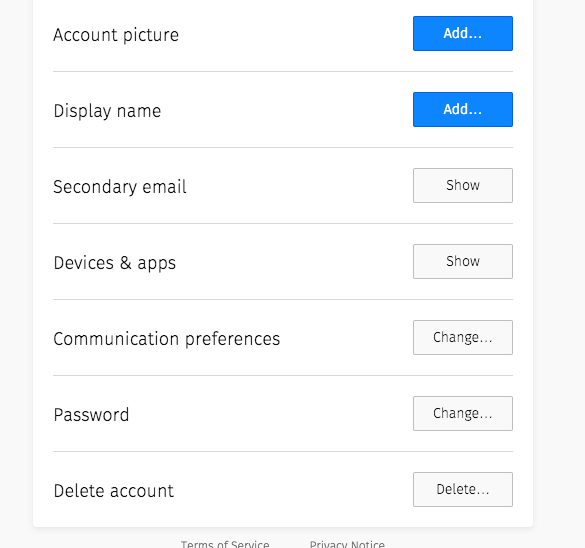
    Some services deserve to get called out, but for being easy to delete as opposed to challenging or impossible. Simplenote and Firefox are two examples that place the delete account button directly on your account page, without the need to hunt around.

    Firefox account page with delete account button
    It’s not that I don’t like you Firefox, this is just an email that I no longer use!

    Why Does this Matter?

    Maybe it doesn’t to you. It probably won’t be an issue for me either, but like subscriptions to newsletters that I am unwittingly added to, old accounts quickly pile up.

    Some accounts I forget exist because they were created for a one time purpose, like a document signing website that I had to sign up for to sign for a lease on an old apartment. That site does not have a self-delete tool, yet it maintains my previous and current address, contact information, and financial information that was used to verify my lease elligibility.

    It should be unacceptable that we cannot control accounts that we create on websites that we supply with our data. If I choose to no longer use that website I should have better recourse than just forgetting that my data is out there in a place that is specifically unwilling to let me manage and remove it.

  • Sometimes You Have to Let a Project Rest

    Yesterday I wrote about my starter child theme For Genesis, and said that today’s post would both be earlier, and cover a code generator.

    As you can probably tell by the time of posting, I didn’t keep that first promise, and I think I’d prefer not to keep the second promise either.

    It’s not that I don’t want to show off this code, tell you how it saves me time, and make it available for your use, since I do. But I realized yesterday that there’s a lot of cleanup that I want to do to both my starter theme and the theme generator.

    I spent a fair portion of my downtime today updating my starter child theme, and making some modifications to my development toolset. I’ll have to talk about that sometime too, since things that I assumed would be simple ended up taking far longer than intended.

    Why it’s OK to Delay

    Because it’s my excuse for not getting something done. ????

    Ok, that’s not quite fair. True, I have given myself some extra time, but I also realized that I needed to step away a bit, and look at this with fresh eyes. An issue that I was having with a build tool earlier came down to it referencing an incorrect folder, pulling the wrong version of a file. A lot of dev work comes down to these simple mistakes, where you’re sure that everything looks like it’s supposed to, but something minor slips by.

    In taking a bit of time to rest, you let yourself view a project fresh when you return, which can often lead to spotting things that you missed before due to carelessness, or more likely over-exertion. Those things that were in your blind spots are suddenly lit up, making you wonder why you wasted hours in the first place.

    So that’s what I’m doing. I’m taking some of my weekend to clean up some personal code because I want to deliver something that has fewer bugs, and is more in-line with the quality that I want to put out.

    I’ll save those posts for next week most likely, since I figure work related things are more likely to be interesting on weekdays. In the meantime, have a good weekend!

  • A Starter Child Theme For Genesis

    A Starter Child Theme For Genesis

    While my last post about a theme was for my my first Gutenberg-ready theme, Malik, I do a good portion of my work with the Genesis Framework, and often use the custom themes that StudioPress sells.

    I like to save time and repurpose code wherever I can, and several years ago I decided that I needed to build my own starter theme. This theme would be a Genesis child theme, and it would incorporate many of the features that I use over and over again for client sites. I put the code up on Github, so you can download or repurpose my Genesis child theme used for Orange Blossom Media projects.

    Overview

    I will clarify now that I haven’t updated this theme in a few months, and I clearly need to give it some TLC this weekend. For instance, I’m still loading version 4.7.0 of FontAwesome, when the superior version 5.0.13 (as of writing) is even better and easier to use. I’ve included it already, but I need to update the maintenance version and remove the unused, older files. Likewise, I need to remove the favicon which has been replaced with a WordPress customizer feature.

    In addition to providing an icon font, the theme enqueues a login stylesheet, as well as some functions that allow you to change the login page title, icon, and layout. This makes it easier to add client information to the WordPress login screen, making it feel more custom to them.

    I also pre-include a few scripts that I use for a lot of sites. This includes Sidr, a script for pull out menus which I use for responsive site menus. I have another script that will load a different type of menu, depending on the use case. Finally, there are some Modernizr scripts included to help integrate with older browsers, and a Javascript file with some modifiable scripts included.

    There are a few includes that load on initialization, including a PHP based mobile detector in the event that I want to selectively run some server-side code. Functions that run on the admin side of the WordPress dashboard are loaded in a separate file from frontend code, and includes lots of hooks and filters to manage dashboard display and Genesis features, making it easier to toggle them on or off as needed. I’ve been slowly moving some of these functions to plugins that I load on client sites in the event that they change themes, but I kept them here for ease of use.

    There are some customizer defaults that get loaded, as well as custom front-page.php, page-landing.php, and single.php. These handle a homepage separate of the latest posts, a page template that removes the header and footer, and an individual post, respectively.

    Finally, the functions.php file defines a lot of sane standards, includes more hooks and filters to toggle as needed, and allows some quick repositioning of Genesis actions on specific page types. The stylesheet likewise makes assumptions of how the site will be designed, allowing you to modify as opposed to create from scratch each time. This should still be updated (for instance to be mobile-first), but it’s a familiar standard for me, and for everyone who’s modified a StudioPress theme already.

    Why Spend Time on This?

    Initially I put extra effort into creating this starter over building a specific client site. I even spend some time now reviewing it and making minor changes over time. Why would I spend time that I could be using for productive work doing something like this?

    The investment of time and focus on planning and making templates and defining standards is a long-term gain. I’ve created a collection of code that can be reused over and over again, and set myself up for success every time I start a new site. It’s almost not a joke when I say that I activate this theme and half the work of building a client site is done for me.

    By using the same codebase over and over again, I’ve allowed myself mental shortcuts that overall make me more productive, and allow me to provide better value by not reinventing a feature or layout every time I get started. It turns out that time was well spent, as I’ve been able to repeatedly apply this code.

    Tomorrow I’ll discuss how I made this process just a bit easier, and learned some new things along the way, to create a theme generator.

    For now, download the starter theme here if you want a leg up on building a custom Genesis themed site! 


    https://github.com/davidwolfpaw/obm-genesis-child

🌙 ☀️